What scene styles does Seasons Live Wallpaper have?
Seasons ships 18 scene styles, from hand-drawn Classic to anime Sakura to a painted Mediterranean coast. Each one redraws all four seasons in its own art, and switching between them takes a single tap in the Scene Style screen.
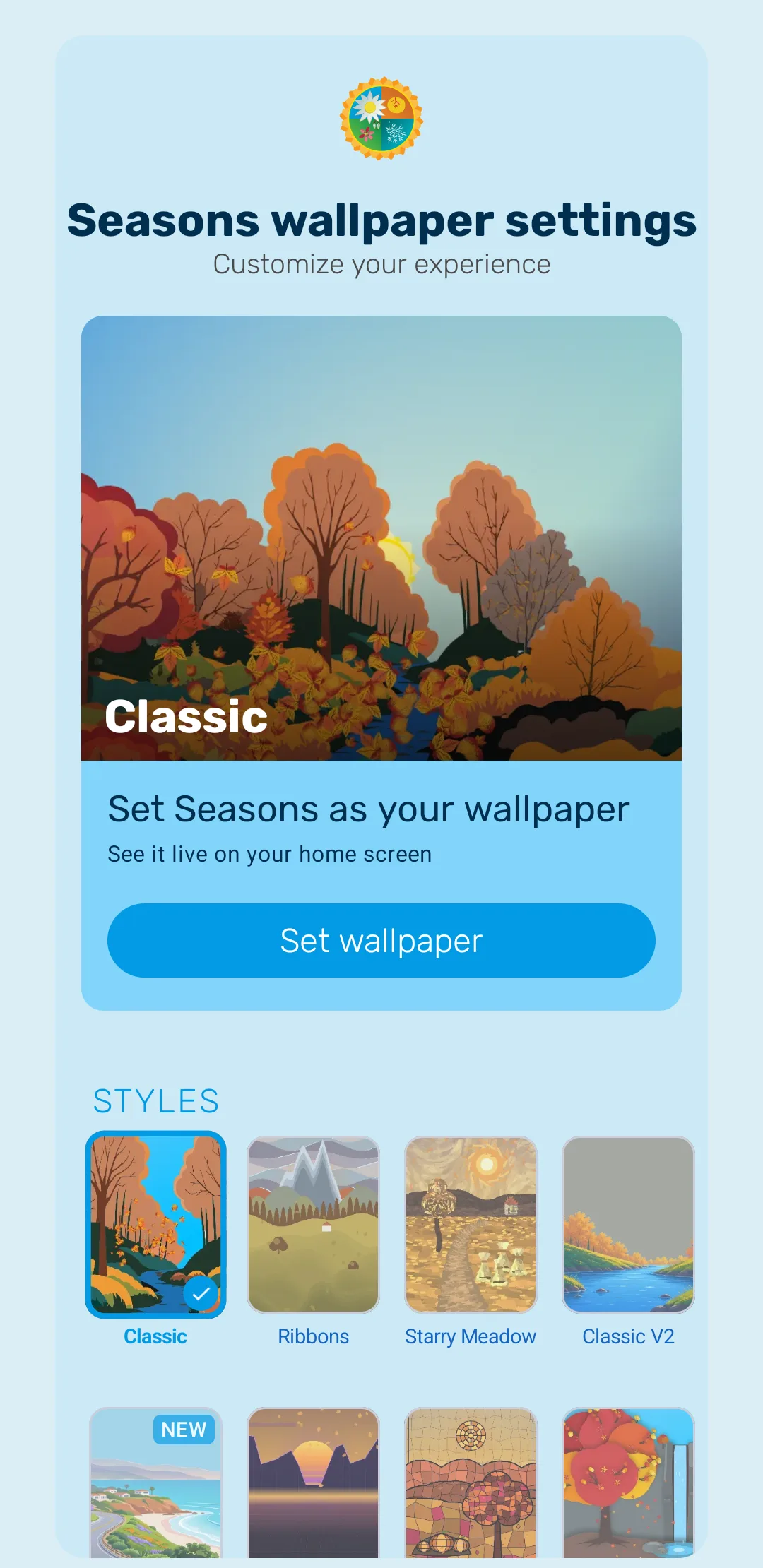
How to switch style
Open the Seasons app. The STYLES grid sits directly below the “Set Seasons as your wallpaper” card on the main settings screen — the app describes the setting as “Choose the visual style for the landscape”. The grid scrolls sideways through all 18 styles, and tapping one applies it immediately, marking it with a tick.
Switching style changes only the artwork of the landscape. The sky, the weather effects and the interactive particles work the same way in every style, so nothing you have configured elsewhere is lost.
The 18 styles
| Style | What it looks like |
|---|---|
| Classic | The original hand-drawn nature scene |
| Classic V2 | Richly illustrated hand-drawn nature — the signature look |
| Sakura Anime | Soft anime meadows beneath drifting cherry blossom |
| Mediterranean Coast | A painted cliffside town above a deep blue sea, with constellations at night |
| Seaside | Tropical coast with palms, falling coconuts, bird flocks, animated waves and a winter lighthouse beam |
| Paper Cut | Layered paper-art with balloons, birds and lanterns |
| Paper Cut v2 | A softer, more layered take on the paper-craft look — pastel hills cut in bands around a winding river |
| Minimal | Pared back to flat pastel shapes — a single tree on a plain hill |
| Pixel Art | The landscape rebuilt in chunky pixel art |
| Watercolor | Soft watercolour washes with loose, bleeding edges |
| Lo-Fi | Muted, dusky hills with drifting lights — the lo-fi study-playlist mood |
| Low Poly | Faceted geometric shapes, with a lighthouse above the water |
| City | A skyline of colourful towers reflected in the water below |
| Synthwave | Retro-80s: a gradient sun sinking between dark peaks over a glowing neon grid |
| Starry Meadow | A painterly, swirling sky above a winding meadow path and a blossoming tree |
| Stained Glass | A leaded-glass mosaic in jewel colours, with a rose-window sun |
| Ribbons | Bands of colour drifting across the sky above layered mountains |
| Enchanted Amazon | A lush jungle: a giant vine-draped tree over a lily-pad lagoon |
Every style draws all four seasons in its own artwork, and the thumbnails in the settings grid cycle through the seasons as you look at them, so you can see how a style handles winter before you commit to it.
Which styles support Rain on glass?
Rain on glass works in every style except Paper Cut, Pixel Art, Minimal and Paper Cut v2.
That effect draws realistic droplets trickling down the screen as if it were a window. It relies on the scene reading as a view through glass, which does not work against the flat, graphic artwork those four styles use, so the app disables it rather than showing something broken. Every other weather effect — rain, snow, fog, thunderstorms, frost, rainbows — works in all 18 styles.
See Weather for the full list of weather controls.
Styles that download their artwork
To keep the install small, some styles ship their artwork as a separate download that fetches the first time you select the style. The settings grid shows the size on the thumbnail before you commit — Enchanted Amazon, for instance, is around 18.5 MB. If you pick one of these while offline, or with very little free storage, the app will tell you and let you retry later. Once downloaded, the style works offline like any other.
New styles keep arriving
The style list has grown steadily and continues to. New styles arrive in regular updates and are covered by your original purchase — Seasons is a one-time purchase with no ads and no subscription, so there is never anything extra to pay for new artwork.
Still to come on this page
- Full-screen sample renders for each individual style
Frequently asked questions
- How many scene styles are there?
- Eighteen. New styles are added in regular updates, and they are included in the original purchase — there is nothing extra to buy.
- Why is Rain on glass greyed out for my style?
- Rain on glass is not available in Paper Cut, Pixel Art, Minimal or Paper Cut v2. Those styles use flat, graphic artwork that the glass effect would fight against. Switch to any other style to use it.
- Does changing style reset my other settings?
- No. Weather, season, day-night and battery settings are independent of the scene style, so they carry across when you switch.
- Why did a style need to download something?
- Some styles ship their artwork as a separate download to keep the app small. You need a connection and a little free space the first time you use one.
Last updated